

REVIEW · NARITA TOURS
Japan Unlimited WiFi Router – Narita Airport Pickup
Arriving in Japan with working internet can save you from a lot of small headaches. This Narita Airport WiFi rental gives you a 4G LTE hotspot, a USB cable, adapter, and power bank, so you can check maps, messages, train details, and translation tools soon after landing. I especially like the simple airport pickup and the flexible 3 to 30-day rental range.
I also like that the router can connect several devices at once, making it useful for couples, families, or anyone carrying a phone, tablet, and laptop. The main catch is the data limit: high-speed use is capped at 3GB per day, and the device must be collected before you can use it. If you miss pickup, there is no refund.
In This Review
- Key points to know before booking
- Picking up your router at Narita Airport
- What comes in the rental package
- How many devices can connect?
- Using 4G LTE around Japan
- The daily data limit and your travel habits
- Rental periods from 3 to 30 days
- Returning the equipment after your trip
- A useful choice for couples and connected families
- What the 3.4 rating means for your decision
- Cancellation and booking details
- Who should book this Japan WiFi rental?
- Should you book the Narita WiFi router?
- FAQ
- Where can I pick up the WiFi router?
- How long can I rent the router?
- What equipment is included?
- How many devices can use the router?
- Is the connection available throughout Japan?
- Is high-speed data unlimited?
- What happens if I do not collect the router?
- Can I cancel for a full refund?
Key points to know before booking
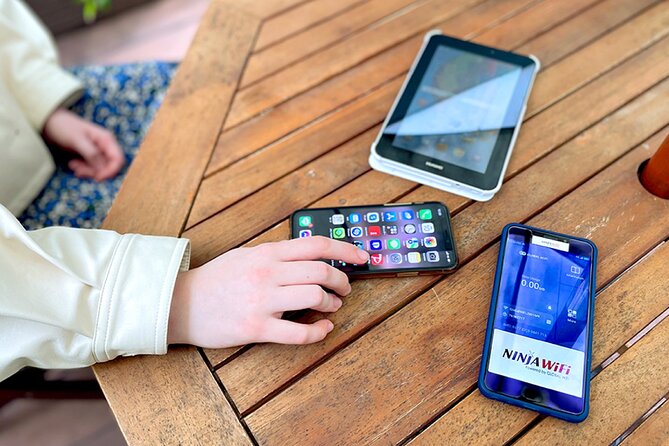
- Pick up at Narita Terminal 1 or Terminal 2: The counters are outside airport security, so collect the device before heading toward your gate.
- Use the router across Japan: The service is designed to provide 4G LTE WiFi while you move between destinations.
- Choose 3 to 30 days: The rental period can fit a short stop in Tokyo or a longer Japan itinerary.
- Power bank included: This matters because a mobile hotspot uses its own battery while it shares data.
- Plan around the 3GB daily high-speed limit: Heavy video use can consume that allowance quickly.
- Check the device capacity carefully: The highlights say up to 10 devices, while the operating information says up to 5 at once.
Picking up your router at Narita Airport
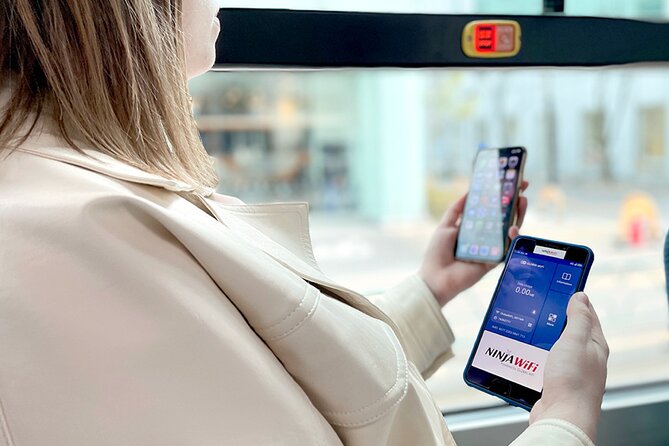
The first step is collecting your package at Narita International Airport. Pickup is available at Terminal 1 or Terminal 2, which gives you a useful choice if your arrival airport building is known in advance. The counters are outside security, so you can pick up the router after landing, before you enter the departure area for a connecting flight.
That outside-security detail is easy to miss. You do not want to pass through the checkpoint and then realize the router is still waiting in the public part of the terminal. Keep your booking confirmation handy on your phone, since confirmation is issued at the time of booking and the activity uses a mobile ticket.
The pickup process should be quick when the package is ready. One customer found the router already packed and waiting at the counter, and described setup as easy. That is the best-case start to a Japan trip: collect the pouch, check the contents, switch on the hotspot, and begin using your phone without hunting for airport WiFi.
Still, allow yourself enough time at Narita. The supplied information does not give exact counter hours or a precise meeting point, so you should check your confirmation carefully before flying. Also confirm which terminal you selected. The airport has two main passenger terminals, and choosing the wrong one could mean an unnecessary transfer before you even begin your trip.
A few more Narita trips to weigh up
- Airport transfer: Narita, Haneda (Tokyo), HND-NRT Airport shuttle
★ 4.5 · 26 reviews - Private Transfer from Narita Airport to Yokohama Port and City
★ 4.5 · 17 reviews - Shared Arrival Transfer : Narita International Airport to Hotel (Central Tokyo)
★ 4.0 · 12 reviews
What comes in the rental package
This is more than a small wireless router by itself. The package includes:
- WiFi router
- USB cable
- Adapter
- Power bank
The power bank is a practical extra, not decoration. A hotspot needs its own battery to broadcast a signal, and your phone will also be working hard as you use maps, photos, messaging, and translation tools. Having a separate power source can keep both devices running during a long transfer or full sightseeing day.
The USB cable and adapter cover the basic charging needs, though you should inspect the equipment at pickup to make sure everything is present. A quick check at the counter is wiser than discovering a missing cable later at your hotel.
The router creates a private WiFi connection for your devices. That can be more convenient than buying and activating a local SIM card, especially if you want to keep your usual phone number and avoid changing settings. It also lets more than one person share the connection, though the exact practical limit needs attention.
How many devices can connect?
The highlights describe the hotspot as supporting up to 10 devices. The operating information says it can connect up to 5 devices at once. Since those figures do not match, I would plan around five connected devices rather than ten.
For one person, this is plenty for a phone and perhaps a tablet or laptop. A couple can share the router without difficulty in normal use. A family or small group should count its devices before booking, especially if several people plan to stream, upload photos, or use video calls at the same time.
More connected devices usually mean more battery use and faster data consumption. Even if the router technically accepts several devices, you may get a better connection by limiting it to the phones and tablets you actually need. Turn off automatic photo backups and app updates if you want to preserve the daily allowance.
Using 4G LTE around Japan

The main reason to rent this device is simple: you can use your usual online tools while moving around Japan. The service is intended to work throughout Japan on a 4G LTE connection, allowing you to access Google Maps, Facebook, Instagram, YouTube, and other online services.
For a visitor, maps are often the biggest benefit. You can check directions, look up station information, and adjust plans without searching for a public network. Internet access also helps with translation and keeping in touch, though the supplied information does not promise a particular speed in every location.
The connection is mobile, not a replacement for unlimited high-speed home broadband. High-speed data is limited to 3GB per day. Basic maps, messages, web pages, and occasional photo sharing may fit comfortably within that allowance. Regular YouTube viewing, large downloads, video calls, and heavy cloud backups can use it much faster.
I would treat 3GB as a daily travel allowance. Download anything essential before you leave your hotel when possible, and avoid leaving video streaming running in the background. The word unlimited in the product name refers to the rental service, but high-speed data itself is limited. That distinction matters.
Same city, a completely different kind of day:
- Narita Airport (NRT) Private Transfer to Central Tokyo
★ 4.5 · 300 reviews - Private arrival Transfer from Narita Airport(NRT) to central Tokyo city
★ 4.5 · 128 reviews - Narita Airport(NRT): Private Transfer to Tokyo/Yokohama 1-9pax
★ 5.0 · 47 reviews - From Narita Airport: Private Layover or Transit Guided Tour
★ 4.8 · 29 reviews
The daily data limit and your travel habits

The 3GB limit is the most important condition in this rental. If you mainly need directions and communication, it may be more than enough. If you expect to watch videos during train rides or connect a laptop for work, you need to monitor your use.
You should also remember that several people sharing one router consume the same daily data allowance. A group that uses the hotspot for navigation may have no trouble. A group that streams video on multiple devices could reach the limit much sooner.
This is where the included power bank helps but does not solve everything. Extra battery lets you stay connected longer, but it cannot restore data speed after you use the daily high-speed allowance. Use the router thoughtfully, and it should serve the basic needs of a sightseeing trip.
Rental periods from 3 to 30 days

The rental period ranges from 3 to 30 days, so the service can suit several types of Japan visit. A short Tokyo stay can use the minimum period, while a longer route through multiple cities can cover the full trip.
The rental is priced at $15.85 per person. Value depends on how many people share it and how long you need it. For a single user on a short trip, the cost buys convenience at the airport and avoids the need to arrange a separate connection after arrival. For two or more people sharing one hotspot, the daily cost per person can become more attractive, as long as everyone stays within the device and data limits.
The phrase per person can be confusing for a shared router. Before booking, check how the selected quantity relates to the number of devices or rental units you need. The supplied details identify a maximum of 10 participants for the activity, but this is a small equipment pickup rather than a guided group tour.
The average booking time is 20 days in advance. That suggests planning ahead is sensible, particularly if you want to settle the pickup terminal and rental dates before your flight. You receive confirmation at booking, so keep those details available for arrival.
Returning the equipment after your trip

The information clearly explains where to pick up the router, but it does not provide a detailed return procedure or a specific return counter in the supplied details. Check your confirmation for the return instructions before leaving Japan, and keep the router, cable, adapter, and power bank together.
That is especially important if your departure is from a different airport or terminal. Do not assume that the same counter arrangement will apply without checking. The pickup counters are outside security, and that detail may matter on departure day as well.
Treat the equipment as a small travel kit rather than a disposable service. Keep the router dry, charge it as needed, and return every included item. The service depends on the next customer receiving a complete package.
A useful choice for couples and connected families

I would consider this rental first for a couple who wants one shared connection. It can also work for a small family, provided you plan around the five-device figure and the 3GB daily high-speed allowance.
It is less compelling for someone who already has a reliable Japan data plan on a phone. In that case, the router adds another device to charge and carry. It is also not ideal for a heavy data user who expects unrestricted high-speed streaming.
The router makes the most sense when you value convenience over the smallest possible price. You collect it at Narita, use one connection for several devices, and avoid swapping SIM cards. That is a straightforward trade: pay for an easy start and shared access, then manage the daily data carefully.
What the 3.4 rating means for your decision
The overall rating is 3.4 from 15 reviews, so I would not describe the service as flawless. The strongest praise focuses on the airport process: the package was ready at pickup, setup was easy, and the power bank was useful.
There is also a serious warning about delivery. One booking involved a requested hotel delivery that never arrived, and the customer could not reach anyone to arrange it. That experience does not directly describe the Narita pickup option, but it tells you to avoid confusion between pickup and delivery arrangements. If you are booking airport pickup, verify that the selected collection location is Narita Terminal 1 or 2.
The no-refund rule makes this especially important. If you do not collect the router, the payment is not refunded. Double-check your arrival airport, terminal, date, and pickup instructions before you fly.
Cancellation and booking details
Free cancellation is available if you cancel at least 24 hours before the experience start time. The cancellation deadline uses local time in Japan, so do not leave the decision until the last minute from another time zone.
Cancellations made less than 24 hours before the start time are not refunded, and changes inside that window are not accepted. Most people can participate, and the activity is near public transportation, which suits an arrival day built around trains or other airport connections.
Who should book this Japan WiFi rental?
I would book it if you want internet from the moment you leave Narita and prefer not to arrange a phone plan after landing. It is a practical fit for couples, small groups, and visitors carrying several devices.
It may suit you particularly well if:
- You need Google Maps and online information throughout Japan.
- You want to keep your existing SIM card in your phone.
- You are visiting for 3 to 30 days.
- You can collect the router at Narita Terminal 1 or 2.
- Your daily use is mostly maps, messages, browsing, and light media.
- You appreciate having a power bank in the package.
I would think twice if you plan to stream heavily, need guaranteed support for ten active devices, or cannot confidently collect the equipment at Narita. The conflicting device limits and the 3GB high-speed cap deserve attention before payment.
Should you book the Narita WiFi router?
Book this rental if easy airport pickup and shared mobile internet matter more to you than unlimited high-speed data. The ready-to-collect package, simple setup, flexible rental length, and included power bank are useful advantages on a Japan trip.
Skip it if your phone already includes dependable Japanese data or if your group needs heavy video use. Most importantly, confirm the terminal and pickup instructions, and remember that a missed collection receives no refund. Used within its limits, this is a sensible convenience purchase for getting your Japan trip moving without an internet scramble.
FAQ
Where can I pick up the WiFi router?
You can pick up the router at Narita International Airport, with counters available at Terminal 1 or Terminal 2. The counters are outside airport security.
How long can I rent the router?
The available rental periods range from 3 to 30 days.
What equipment is included?
The rental includes a WiFi router, USB cable, adapter, and power bank.
How many devices can use the router?
The activity highlights say the hotspot can connect up to 10 devices, while the operating information says up to 5 devices at once. Because of this difference, plan around five devices.
Is the connection available throughout Japan?
The router is intended to provide 4G LTE WiFi wherever you go in Japan.
Is high-speed data unlimited?
No. High-speed data is limited to 3GB per day.
What happens if I do not collect the router?
A refund will not be provided if you do not collect the WiFi router.
Can I cancel for a full refund?
Yes, if you cancel at least 24 hours before the experience start time. Cancellations made less than 24 hours in advance are not refunded, and changes within that period are not accepted.
Just added around Narita
- Shared Arrival Transfer : Narita International Airport to Hotel (Central Tokyo)★ 4.0 · 12 reviews
- For Narita Airport Users: Layover or Transit Guided Private Tour★ 5.0 · 22 reviews
- Airport transfer: Narita, Haneda (Tokyo), HND-NRT Airport shuttle★ 4.5 · 26 reviews
- Private Transfer from Narita Airport to Yokohama Port and City★ 4.5 · 17 reviews
- Tokyo Layover Tour with a Local – Private & Tailored to You★ 4.5 · 12 reviews
- Private Arrival Transfer : Narita International Airport to Central Tokyo City★ 4.5 · 12 reviews
- [Narita Airport Terminals 1, 2] 40-60km Sawara Itako Historic Bike Tour★ 5.0 · 13 reviews
- 3 Day Japan Highlights Tour: Tokyo, Mt.Fuji, Nara, Kyoto, Osaka★ 5.0 · 22 reviews
Narita Tours, compared.
Private arrival Transfer from Narita Airport(NRT) to central Tokyo city
Read our review →
Narita Airport(NRT): Private Transfer to Tokyo/Yokohama 1-9pax
Read our review →
From Narita Airport: Private Layover or Transit Guided Tour
Read our review →
Airport transfer: Narita, Haneda (Tokyo), HND-NRT Airport shuttle
Read our review →
3 Day Japan Highlights Tour: Tokyo, Mt.Fuji, Nara, Kyoto, Osaka
Read our review →
For Narita Airport Users: Layover or Transit Guided Private Tour
Read our review →
Private Transfer from Narita Airport to Yokohama Port and City
Read our review →Browse the lists this tour appears in